
Description
Core Concept: Personal Style as Play
At its heart, Style Studio: Wardrobe Designer is about using fashion as a medium for creative expression. Players are not racing against a clock or competing with others. Instead, they are invited to explore combinations of tops, bottoms, dresses, shoes, hats, and jewelry on a virtual doll. The game rewards thoughtful decisions about color coordination and thematic consistency. This approach makes it accessible to players of all ages and skill levels, from young children learning about colors to adults looking for a calming creative outlet. The emphasis is on the process of designing, not on achieving a perfect score.
Building Your Look: Tools and Controls
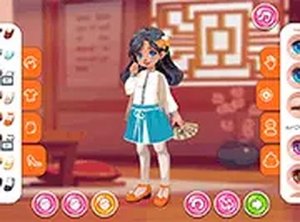
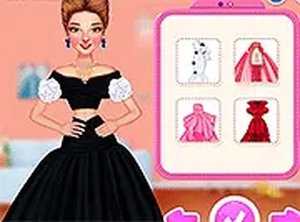
The interface relies on simple drag-and-drop mechanics. After selecting a doll to work with, players browse a collection of clothing items organized by category. Each piece can be placed onto the doll with a single motion, allowing for rapid experimentation. The system provides immediate visual feedback, so players can see how different colors and styles interact. This intuitive control scheme lowers the barrier to entry, ensuring that even those unfamiliar with video games can start creating outfits within minutes. The absence of complex menus or timers keeps the focus squarely on the creative task at hand.
Scoring and Rewards: Encouraging Thoughtful Choices
The scoring system is designed to reinforce good design principles. Points are awarded based on how well an outfit matches a given theme and how harmoniously the colors work together. This feedback loop helps players develop an eye for fashion without feeling pressured. After submitting a look, players receive points that can be used to unlock additional clothing items and accessories. These unlockables expand the available palette, encouraging players to revisit levels and try new combinations. The system rewards persistence and curiosity, not speed or perfection.
Thematic Challenges: Adding Variety to Each Session
To keep the experience fresh, the game may present players with specific themes or style prompts. These challenges might ask for a look suitable for a garden party, a winter outing, or a casual day at the beach. Each theme introduces a new set of constraints, nudging players to think about context and appropriateness in their designs. This structure prevents the gameplay from becoming repetitive and encourages players to step outside their usual preferences. The variety ensures that every session can feel different, even when using the same core set of tools.
Progression and Replayability: Growing Your Wardrobe
As players earn points and unlock new items, their creative options steadily expand. Replaying completed levels is encouraged, as higher scores can yield additional rewards. This progression system provides a gentle sense of accomplishment without introducing difficulty spikes or frustrating obstacles. The game respects the player's time by making each session feel productive, whether they are experimenting with a new theme or refining an earlier design. The gradual accumulation of new pieces keeps the experience engaging over the long term, as there is always another combination to try.
Visual Style and Atmosphere: A Calming Creative Space
The game's visual design supports its relaxed tone. Colors are bright but not overwhelming, and the interface is clean and uncluttered. The doll and clothing items are rendered in a friendly, approachable art style that appeals to a broad audience. Background music and sound effects, if present, are likely to be soft and unobtrusive, reinforcing the game's role as a peaceful activity. This thoughtful presentation makes Style Studio: Wardrobe Designer suitable for short breaks or longer creative sessions, providing a space where players can unwind while exercising their imagination.







Player Comments
Sign in to comment
You must be logged in before posting a review or rating.
No account? Create one
No comments yet. Be the first to comment!