
Description
Game Introduction
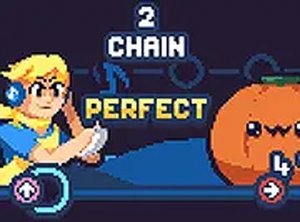
Stewie Rhythm Duel Arcade is a family-friendly music-based arcade game where players engage in rhythmic duels against the character Stewie. Inspired by the popular Friday Night Funkin modding community, this web-optimized version allows you to enjoy the core rhythm gameplay directly in your browser. The objective is to match musical notes and keep the beat going through a series of songs. It is designed to be accessible on various devices, including low-end PCs, Chromebooks, Mac, and Linux, ensuring a smooth experience without requiring powerful hardware or large downloads.
How to Play
Players use keyboard arrow keys to match the rhythm of the song. Notes appear on the screen and move toward a target area; you press the corresponding key when the note reaches the target to score points and keep the music playing. The game starts at a comfortable pace and gradually increases in speed and complexity as you progress through the songs. Timing is key—hitting notes accurately builds your score and helps you complete the musical duel. No prior experience is needed, just a sense of rhythm and a love for music.
Game Features
This game is fully optimized for web browsers, meaning no downloads or installations are required. It runs smoothly on low-end devices, including Chromebooks, Mac, and Linux systems. The content is family-friendly, with catchy tunes and simple controls that make it easy for players of all ages to jump in. The game is free to play and offers a progressively challenging experience as songs become faster and more complex. It is a great way to enjoy rhythm gameplay without worrying about hard drive space or system requirements.
Tips for Success
Practice regularly to improve your timing and reaction speed. Start with slower songs to get a feel for the note patterns, then gradually move to faster tracks. Focus on accuracy over speed—hitting notes correctly is more important than rushing. If you miss a note, don't get discouraged; keep going and try to stay in sync with the beat. Listening to the music carefully can help you anticipate upcoming notes. Finally, take short breaks if you feel fatigued to maintain focus and enjoyment.











Player Comments
Sign in to comment
You must be logged in before posting a review or rating.
No account? Create one
No comments yet. Be the first to comment!