
Description
Game Introduction
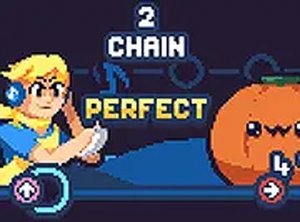
Beat Rhythm Arcade is a rhythm game that combines music with quick reactions. Inspired by popular rhythm game series, this version transforms each musical note into a visual cue that players must match in time. The core objective is to complete each song by pressing the correct keys as the notes appear, maintaining a steady rhythm throughout. What makes this game unique is its focus on timing and focus, turning every beat into a challenge that tests your ability to stay in sync with the music. The game is designed to be safe for all ages, with no mature themes or violent content. Players can enjoy a variety of songs while improving their coordination and reflexes. The game includes performance optimization options, such as disabling visual effects or lowering quality, making it accessible on older computers, Chromebooks, Mac, or Linux systems. The goal is to finish each track with as few missed notes as possible, encouraging practice and skill development. It offers a fresh twist on traditional rhythm gaming, blending music and quick reactions into an engaging experience.
How to Play
Players typically use the arrow keys on their keyboard to match the notes that appear on screen. Each note corresponds to a specific key, and pressing it in time with the music helps maintain the rhythm. If the game feels slow or has visual distractions, players can open the menu and adjust settings like turning off splash effects or lowering the quality. The objective is to complete the song with few missed beats. The controls are simple, but the challenge increases with faster songs. Practice helps improve timing and accuracy. The game is easy to start and suitable for players of all skill levels.
Game Features
Rhythm-based note matching that tests timing and coordination. Performance optimization options for smooth play on various devices, including older computers and Chromebooks. Free online play with no downloads needed. Family-friendly content with no violence or mature themes. Simple arrow key controls for easy access. The game may include multiple songs with varying difficulty levels.
Tips for Success
Practice regularly to improve your timing and accuracy. Start with slower songs to get comfortable with the controls. Use the performance settings to reduce visual distractions if needed. Focus on the rhythm of the music rather than the visual cues. Take breaks to avoid fatigue and maintain concentration. Experiment with different songs to challenge your reflexes and keep the experience fresh.







Player Comments
Sign in to comment
You must be logged in before posting a review or rating.
No account? Create one
No comments yet. Be the first to comment!