
Description
Game Introduction
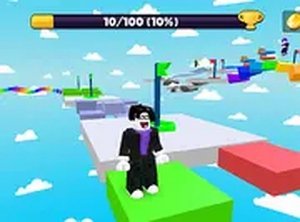
Kogama Obstacle Course Challenge is a 3D online game where players guide a small character through a series of playful obstacles. The core objective is to reach the finish line without falling into the water below. The path is filled with gaps, moving blocks, and other challenges that require careful timing and coordination. The game's colorful graphics and humorous design make it suitable for players of all ages. It offers a lighthearted experience that combines fun with a sense of achievement. Players can enjoy the game alone or with others in a multiplayer setting, adding a social element to the challenge. The game is free to play directly in a web browser, with no downloads or installations required. It is an excellent choice for anyone looking for a quick, engaging activity that tests reflexes and patience. Each attempt provides a fresh opportunity to learn the course layout and improve performance. The game rewards persistence and careful observation, making each successful run feel rewarding.
How to Play
Players control their character using keyboard inputs or on-screen controls. The main actions involve moving left, right, and jumping at the right moments to avoid gaps and obstacles. If the character falls into the water, the player must restart the level from the beginning. The game emphasizes careful timing and practice, as each obstacle requires precise movement. Players can switch to full screen mode for a better view of the course. For the best experience, using a keyboard allows for quicker reactions. Each attempt helps players learn the course layout and improve their performance over time.
Game Features
The game includes a multiplayer online mode where players can compete or cooperate with others. The obstacle course offers a variety of challenges that gradually increase in difficulty. The character designs are cute and add charm to the overall experience. The game runs entirely in a browser for free, with no installation needed. Full screen mode is available for an immersive experience. Players can enjoy the game on desktop computers with keyboard and mouse controls.
Tips for Success
Practice regularly to become familiar with the layout of each obstacle course. Focus on timing jumps carefully, especially when approaching moving blocks or narrow gaps. Observing other players in multiplayer mode can provide useful strategies. Stay patient, as each fall teaches something new. Using a keyboard allows for more precise control. Taking short breaks helps maintain a calm mind and improves reaction time.


Player Comments
Sign in to comment
You must be logged in before posting a review or rating.
No account? Create one
No comments yet. Be the first to comment!